Parker's Rewards
- 4.1
- Rating
- 100.00K
- Installs
- Free
- Price

 Analysis by App-foxy
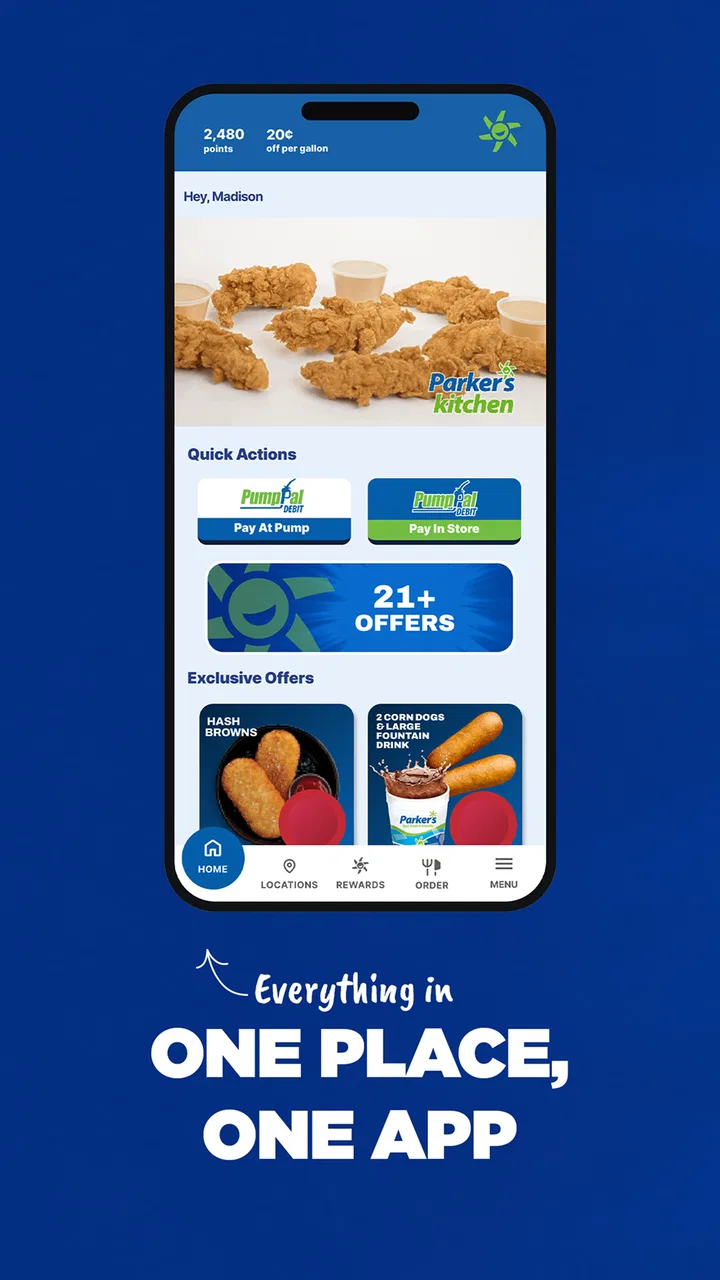
I tried Parker's Rewards as a straightforward way to connect everyday drink purchases with a loyalty program, and my overall impression is that it is most useful when you already visit Parker’s regularly. It is a free Food & Drink app from Parkers Admin, built around rewards rather than menus, recipes, delivery, or broad restaurant discovery. The central invitation is simple: install it, join Parker’s Rewards, and receive a free large drink. That makes the first decision easy, although the longer-term value depends on how often Parker’s fits into your routine.
What interested me most was not the size of the reward, but how much friction the app adds between seeing the offer and actually using it. A loyalty app has to work at an awkward moment: I may be standing at a counter, holding a phone in one hand, dealing with a queue, glare, noise, and limited time. In that setting, clear navigation matters more than a long list of features. My experience with this app is best understood through that practical lens: can I read it, move through it comfortably, and use it when my attention is elsewhere?
How Parker's Rewards handles reading and navigation
I find that Parker's Rewards is easiest to judge as a quick, task-focused app rather than something to browse at length. This section looks at how its purpose shapes reading and navigation, including why a clear routine can matter more than exploring every screen. I’ll also consider the practical habits that help keep a short counter interaction predictable.
You May Also Like

 AccuWeather: Weather Radar
AccuWeather Review: A Quick, Clear Forecast for Everyday Decisions
For everyday plans, the best forecast is the one you can understand quickly. AccuWeather makes rain timing, radar, and local conditions easy to act on, with a few trade-offs.

 Hill Climb Racing
Why Hill Climb Racing Still Turns Crashes Into One More Run
A tiny car, a bumpy hill and one more upgrade: Hill Climb Racing keeps resurfacing because its simple chaos makes every near-miss feel personal.

 AliExpress - Shopping App
AliExpress Makes Global Shopping Feel Personal, but Shoppers Bear the Risk
AliExpress turns a global marketplace into a pocket-sized discovery engine. Its reach is useful, its shopping loop compelling, and its trade-offs easy to miss.

 Lords Mobile: Kingdom Wars
Lords Mobile Is a Kingdom-Building Routine, Not a Quick Match
A case-by-case verdict on the building, battles, device demands, and social commitments that make Lords Mobile rewarding for some players and exhausting for others.

 PDF Scanner app - TapScanner
TapScanner Makes Paperwork Easier to Capture, Check, and Share
TapScanner makes scanning with a phone feel less like a rescue operation and more like a dependable step in getting work done. Its capture tools are useful, though not flawless.

 Block Blast!
 Shows How Much a Puzzle Game Can Leave Out
A quiet grid game shows why puzzle players increasingly value instant clarity, repeatable skill and low-pressure play—and where the genre still needs to catch up.
More From Our News Desk
View All News


A focused purpose helps first-time users
The strongest accessibility-related quality is the app’s narrow purpose. Parker's Rewards is not trying to be a full ordering platform or a general-purpose food guide. Its identity is clear from the name and from the opening reward. For someone who wants a loyalty account without learning a complicated restaurant system, that focus can make the first visit feel manageable.
I also think the free starting offer lowers the risk of trying it. There is no purchase price for the app itself, and the content rating is Everyone, so it is positioned as something a broad range of customers can explore. The first useful action is obvious: join the rewards program and look for the drink benefit. That is much easier than beginning with a crowded home screen full of unrelated promotions.
Still, a focused purpose does not automatically make every screen easy to use. Loyalty applications often ask users to move between an account area, reward information, and a redemption view. When I am using one in a store, I want labels that describe the action plainly rather than decorative buttons or unexplained symbols. Parker's Rewards works best for readers who are comfortable scanning a compact mobile interface and recognizing the usual patterns found in rewards apps.
Reading comfort matters more than visual polish
For users with reduced vision, reading comfort is likely to be more important than the promotional design. A reward can be valuable, but it becomes difficult to use if text is small, contrast is weak, or important details blend into a busy background. I would approach this app with the phone’s display settings already adjusted to the user’s preference, then check whether the reward wording and account controls remain understandable without relying on color alone.
This is also where the app’s context creates a challenge. A screen that feels readable at home may be harder to interpret under bright outdoor light or inside a busy shop. My practical advice is to open the app before reaching the counter, confirm where the reward appears, and avoid trying to learn the layout while other people are waiting. That small preparation step can make the experience much calmer for anyone who needs extra time to read.
The app’s current version is 42.02.01, which suggests an actively maintained product rather than an abandoned download, but a version number by itself does not tell me how every accessibility setting behaves. I would not assume that larger system text, screen magnification, or a screen reader will produce a perfect layout. The sensible approach is to test the specific screens you need before depending on the app during a purchase.
Navigation for people who prefer predictable routines
People with cognitive disabilities, attention difficulties, or simply a dislike of complicated loyalty systems may appreciate a predictable routine. I would use Parker's Rewards in the same order each time: open the app, go directly to the reward or account area, check what is available, and present the relevant screen when paying. Repeating that sequence reduces the need to remember where each control lives.
A useful habit is to avoid browsing the app while distracted. If I am driving, walking through a car park, or carrying food, the app is not the place to make decisions. I would finish the setup at home, then treat the in-store visit as a quick confirmation rather than a discovery session. This is a small but meaningful difference between an app that feels accessible and one that becomes stressful in real life.
Another trade-off is that loyalty apps reward regular engagement, while some users prefer not to maintain another account. If remembering login details, checking rewards, or keeping the app ready feels like work, the free drink may not compensate for the ongoing mental effort. Parker's Rewards is better suited to someone who already has a repeat Parker’s routine than to someone who visits only occasionally and wants a completely passive benefit.
Motor, sensory, and real-world use
A rewards app is used in a physical place, so comfort depends on more than screen controls. Here I’m considering how grip, timing, glare, noise, and divided attention can affect a visit, and how preparing the app ahead of time can reduce the pressure. Those everyday conditions also help explain where the experience may still be difficult.
One-handed use and timing at the counter
Motor access is easy to overlook because the task sounds simple. In practice, I may need to unlock the phone, open the app, find the reward, and hold the screen where staff can see it. That can be awkward for users with limited dexterity, tremors, joint pain, or difficulty making precise taps. The best workflow is to prepare before ordering, keep the phone stable, and avoid repeated navigation when the reward screen is already available.
I would also recommend using a secure grip or placing the phone on a counter when possible. A loyalty app should not require frantic tapping, especially when a user is managing a cane, bag, child, or drink at the same time. If a friend or support person is present, sharing the task can help: one person handles the order while the other opens the reward. That is not a flaw in the app alone; it is a realistic way to make mobile rewards more usable in a busy environment.
Users who rely on switch access, voice control, or other alternative input methods should test the important actions before they arrive at Parker’s. Labels need to be specific enough for voice navigation, and controls need to be reachable without precise gestures. I cannot treat compatibility as guaranteed simply because the app runs on a modern phone. A short trial at home is more reliable than discovering an input problem in a queue.
Noise, glare, and sensory overload
The store environment can be more difficult than the app itself. Bright lighting may create glare, background noise may make communication harder, and a crowded counter can increase sensory pressure. For someone who is sensitive to noise or fast-moving surroundings, I would open the reward before entering or wait in a quieter area. The goal is to reduce the number of things happening at once.
Visual promotions can also be tiring for users who are sensitive to animation, flashing, or dense layouts. I would keep the interaction task-focused instead of scrolling through every offer. If the app presents the free large drink clearly, there is little reason to explore more than necessary during a purchase. This is one of the practical strengths of a narrow loyalty app: I can choose a short path and ignore the promotional parts that do not help me at that moment.
For users with hearing loss, the most important question is whether the redemption process can be understood visually without relying on spoken instructions from staff. I would want the reward status and any required action to be visible in text. At the counter, showing the phone may be easier than trying to follow a verbal explanation in a noisy shop. If a staff member needs to confirm something, a written exchange or support person may make the interaction more comfortable.
Situational access for ordinary routines
A realistic example is a morning stop at Parker’s before work. I might be wearing gloves, carrying keys, and trying not to make a queue wait. If I have already joined Parker’s Rewards and opened the relevant screen before walking in, the app can fit neatly into that routine. If I wait until payment to download it, create an account, and understand the reward, the same offer becomes much less convenient.
The app is also useful for households where one person usually handles purchases for others. A parent, partner, or support worker can prepare the reward account and keep the phone ready, making the benefit available even when the person receiving the drink is not the person managing the app. That arrangement may be especially practical for users who find account setup or small touch controls difficult.
On the other hand, the program is less attractive for people who do not visit Parker’s often enough to remember it. A general payment method, a physical loyalty card, or a retailer-wide rewards program may be easier if the user already carries one consistently. Parker's Rewards has a clear advantage when the brand is part of a regular route; it has less value when it becomes another rarely opened icon.
Where the experience still creates barriers
Planning can make Parker’s Rewards more manageable, but it cannot remove every obstacle tied to phone access or a busy shop. I’ll look at the limits that matter most when someone relies on assistive input, needs extra time, or prefers not to maintain another account. That distinction helps separate barriers a routine can soften from ones that may make a different way to participate preferable.
The reward is clear, but the process still needs preparation
The promise of a free large drink is easy to understand, yet a reward app involves more than the headline benefit. Users may still need to know when to open the app, which screen to show, and what to do if the phone is difficult to operate at the counter. I would not describe the experience as fully effortless. Its accessibility depends partly on planning, especially for people who need larger text, alternative input, or more time to process each step.
That preparation requirement is the main weakness I noticed. A genuinely inclusive loyalty experience should work for rushed users as well as confident smartphone users. Parker's Rewards can be made more manageable through a prepared routine, but that places responsibility on the customer. Someone who expects to install the app moments before ordering may find the process less welcoming than the store summary suggests.
Phone access and account dependence
A phone-based reward naturally excludes some situations. The battery may be low, the device may be shared, or the user may not be comfortable handling a smartphone in public. A person with limited data access, an older device, or difficulty remembering account credentials may face extra friction even though the app itself is free. The minimum operating system is Android 7.0, so compatibility is broad for many Android users, but an operating-system requirement does not solve every practical access issue.
This is where a physical or staff-assisted alternative would be valuable for people who cannot reliably use the app. I would check with Parker’s directly if the reward is important and phone use is difficult, rather than assuming that every customer can redeem it in the same way. The app is a useful channel, not a replacement for every possible way of participating in a loyalty program.
Privacy, attention, and the cost of another app
Even without a monetary charge, a rewards app has a personal cost: it occupies storage, asks for attention, and becomes another account to maintain. Some users are happy to exchange that effort for a regular drink benefit. Others would rather pay normally and avoid managing promotional notifications or account details. I see this as an important accessibility issue because cognitive load is not limited to people with diagnosed conditions; many users are already overwhelmed by the number of apps they are expected to use.
My advice is to decide based on frequency, not on the word “free” alone. If Parker’s is a weekly stop, the setup may quickly become worthwhile. If it is an occasional visit, the benefit may not justify learning the app and keeping it ready. That is also where a simpler alternative can win: a familiar payment method or a loyalty system already used for several stores may require less memory and fewer steps.
Who should use it and who should choose another option
I would recommend Parker's Rewards to regular Parker’s customers who want a focused, no-cost way to collect a welcome drink benefit and are comfortable preparing the app before a visit. It is particularly suitable for people who prefer a single-purpose loyalty tool over a large food platform. The app’s broad Everyone rating and Android 7.0 minimum make it approachable for many users, while the free price removes an obvious barrier to trying it.
I would be more cautious for anyone who needs guaranteed screen-reader behavior, dependable voice control, very large text, or a completely hands-free process. Those users should test the actual reward and account screens on their device before relying on them. The same caution applies to people who find crowded environments difficult: the app may be manageable, but the store interaction can still be demanding.
Compared with ordinary payment, the app offers a possible reward but adds setup and attention. Compared with a physical loyalty card, it avoids carrying another card but depends on battery, phone access, and touch interaction. Compared with a broad restaurant rewards platform, it is less useful for comparing many businesses, yet its narrower purpose may be easier to understand. My choice would depend on which inconvenience is smaller for me: carrying a card, maintaining another app, or giving up the reward entirely.
The app has reached over 100 thousand installs and holds a 4.2 average from around 674 ratings, with about 260 written reviews. Those figures suggest that it has found a real audience, but they should not replace personal testing. Ratings rarely explain whether an app works well with a particular display setting, input method, or sensory need. I would treat them as a sign that the product is established enough to investigate, not as proof that it will suit every user.
An inclusive verdict for everyday Parker’s visits
My final view is positive but conditional. Parker's Rewards is a sensible Food & Drink app when the user already visits Parker’s and wants to turn a regular purchase into a loyalty benefit. Its clearest advantage is focus: I do not need a complicated food marketplace to reach the main purpose. The free large drink gives the first use a concrete reason, and the app can fit a repeatable routine if I prepare it before arriving.
Its inclusive potential is strongest for users who can read a compact mobile interface, tap familiar controls, and manage the phone during a short store interaction. It becomes less comfortable for people who need extensive assistance, have difficulty with precise gestures, or are sensitive to glare, noise, and rushed decisions. In those cases, the best strategy is to test the app at home, enlarge the display if needed, prepare the reward screen early, and involve a trusted helper when that makes the visit easier.
Parkers Admin has produced a practical loyalty tool rather than an all-purpose food companion. That is both its strength and its limit. I would keep it installed if Parker’s were part of my normal route, but I would not recommend it solely because the opening reward sounds appealing. The most accessible way to use Parker's Rewards is to make the in-store interaction predictable before the queue, the glare, and the noise become part of the task. For regular customers who can follow that routine, it is worth trying; for everyone else, a simpler loyalty option may be the kinder choice.
FAQs for Parker's Rewards
01What is Parker's Rewards and how does it work?
Parker's Rewards is a loyalty program app that allows users to earn points for purchases made at participating locations. You accumulate points by scanning your phone at checkout, which can then be redeemed for discounts, free items, or special offers. The app also features exclusive deals and promotions for members.
02Is Parker's Rewards available for both Android and iOS devices?
Yes, Parker's Rewards is available for both Android and iOS platforms. You can download the app from the Google Play Store for Android devices or the Apple App Store for iOS devices. Ensure that your device meets the necessary system requirements for optimal performance.
03Are there any costs associated with using Parker's Rewards?
Parker's Rewards is free to download and use. There are no subscription fees or hidden charges. However, purchasing items to earn points will incur costs. Occasionally, the app may offer in-app purchases, such as additional rewards or special deals, but these are optional.
04How do I redeem points earned in Parker's Rewards?
Redeeming points in Parker's Rewards is straightforward. Simply open the app, navigate to the rewards section, and select the item or discount you wish to redeem. The app will generate a code or barcode that you can present at checkout to apply your discount or claim your reward.
05What kind of rewards can I expect from Parker's Rewards?
Parker's Rewards offers a variety of rewards, including discounts on future purchases, free items, and exclusive members-only promotions. The specific rewards can vary by location and may change over time. Regularly check the app for the latest offers and promotions available to you.
Pros
- User-friendly interface enhances experience.
- Extensive reward options for various activities.
- Quick signup process with minimal steps.
- Regular updates keep features fresh.
- Integrated with popular payment methods.
Cons
- Occasional bugs disrupt user experience.
- Limited customer support availability.
- Rewards can take time to redeem.
- Requires internet for most functionalities.
- Frequent notifications can be intrusive.

Parker's Rewards
Gallery